Having trouble viewing the message below?   View this message in a web browser.
Inside Timeline Maker
February 2010
 

An Introduction

Bob Thomas, President

Welcome to the first issue of our newsletter, "Inside Timeline Maker".

Just like Timeline Maker, our goal is to provide information that is simple, straightforward and most of all - useful. Each issue will include handy tips and techniques to improve your knowledge of Timeline Maker's features and capabilities, actual examples and comments from users featuring "Timeline Maker in Action", a free downloadable "Theme of the Month", plus other useful links to new Timeline Maker resources.

As a Timeline Maker customer, you have been automatically subscribed and we invite you to contact us at editor@timelinemaker.com with any thoughts or suggestions for future issues or to be featured in our "Timeline Maker in Action" section.

Please read, enjoy and we look forward to hearing from you.


Tips and Techniques:


  • Assigning Color to Categories

You may find some events in a specific category are different colors, not the single color as was intended or expected. This is easily changed.
Click to Continue

  • Placing Events on a Flag Chart - Best Practices

Flag charts with many events grouped together can tend to display as long lists of events as the program attempts to place all the events in their most relevant position on the timeline.
Click to Continue

  • Windows Bug Causes Chronology Print Error

Attempting to print the chronology shows this error instead... "AN ERROR HAS OCCURRED IN THE SCRIPT ON THIS PAGE" followed by... "PERMISSION DENIED".
Click to Continue


Timeline Maker In Action:


  • 120 Foot Timeline

Just the size of this timeline is incredible. Jason Shah, Director of Technology for the Yogi Divine Society exported 7 timelines to PDF each measuring 200 inches. Putting them all together made this 120 foot chart.
View Larger Image

 
  • Technology Industry

I manage the IT organization and a lot of our work is project driven so I leverage the tool to allow people to visualize all the projects that may be going on at once.


Ingra C.
IT Manager, Texas Instruments
 

Theme of the Month:


  • New Spring

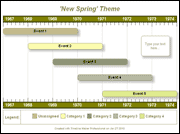
"New Spring" is the first of our free downloadable themes. Download via the link below.
Download Theme


Next Month's Issue:


In next month's issue we'll be looking at the timescale and some tips to get the results you're looking for. Also, we'll be taking suggestions from readers, so submit any topics you would like to see covered to editor@timelinemaker.com.

In This Issue:
Reader Poll:
Did you find the information in this newsletter helpful?

Save 10% on Additional User Licenses